
Microsoft Copilot Wave 4: Five Updates Business Owners Need to Know About
Microsoft has unveiled its latest wave of Copilot updates, and while some of the changes are technical under the hood, the overall direction is clear: making AI easier to use, more connected to your business, and capable of taking on more work independently.
For business owners, the real question isn’t what Microsoft has changed. It’s what those changes could mean for productivity, decision-making and day-to-day operations.
Here are the five key announcements from the latest Copilot Wave 4 release and why they matter.
These updates are not all arriving at once. Microsoft has started announcing and previewing the Wave 4 capabilities, with rollout expected across October and November. Some features will appear first through preview or Frontier access before becoming more widely available.
1. Home: A Single Starting Point for Chat and Cowork
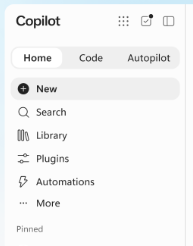
One of the biggest challenges for many users has been understanding which Copilot experience to use and when. Microsoft is addressing this by bringing Chat and Cowork together into a single Home experience.
Previously, users had to decide whether they wanted to work directly with Copilot through a conversation or delegate a larger task to Cowork. The distinction wasn’t always obvious.
The new Home experience aims to provide one place to start, with Microsoft working towards a future where Copilot can recommend the most appropriate approach automatically.
What this means for businesses
The simpler the experience, the more likely employees are to use it.
Reducing confusion around different AI tools could help organisations achieve higher adoption rates while reducing training requirements. Instead of staff asking, “Which Copilot do I use?”, they’ll simply describe the outcome they’re looking for.
Microsoft is also continuing to improve document, spreadsheet and presentation creation directly from Copilot, helping users move from an idea to a usable file with fewer interruptions along the way.
2. Code: Building Apps Using Natural Language
Perhaps one of the most significant announcements is a new coding experience designed specifically for non-developers.
Users will be able to describe what they want in plain English and Copilot can generate the app or tool required.
For example, instead of asking a developer to build a simple tracking application, a business user could potentially describe the problem and have Copilot create a solution on their behalf.
What this means for businesses
Most organisations have processes that outgrow spreadsheets but never quite justify a full software development project.
This new capability could help bridge that gap.
Teams may be able to create:
- Internal tracking tools
- Reporting dashboards
- Team applications
- Process management solutions
without needing specialist coding knowledge.
Importantly, Microsoft has also announced a managed runtime environment to help ensure these user-created solutions remain governed, secure and visible to IT administrators.
The opportunity here is clear: faster innovation without necessarily increasing development costs.
It is also worth noting that Microsoft talks about this as usage-based pricing. In simple terms, some of the more advanced AI capabilities may be charged based on actual usage, rather than being fully covered by a standard licence. This could include Copilot Credits or pay-as-you-go billing for certain agent, app-building and long-running AI activities.
3. Autopilot: AI That Works Proactively in the Background
Until now, most AI interactions have been reactive.
You ask a question and AI responds.
Autopilot introduces a different approach.
Instead of waiting for instructions, Autopilot can be given goals, responsibilities and permissions, then work proactively in the background.
Microsoft describes this as moving towards AI acting more like a digital colleague.
For example, an Autopilot could:
- Monitor supplier performance
- Track actions from meetings
- Watch Teams channels for important updates
- Identify issues that need attention
- Schedule follow-up meetings when specific conditions are met
Autopilot builds on the direction Microsoft introduced with Scout, but the shift to a cloud-based experience is important. While Microsoft Scout was desktop-based, Autopilot is designed to work across Microsoft 365 in the cloud, making it better suited to ongoing, connected work that can run in the background.
What this means for businesses
This could be one of the most transformative developments in the entire release.
Many employees spend significant amounts of time chasing updates, tracking tasks and following up with colleagues.
If AI can handle some of that administrative work automatically, staff can spend more time focusing on customer service, strategic work and business growth.
For business owners, the potential value isn’t simply working faster. It’s reducing the amount of routine coordination work that consumes valuable time across the organisation.
4. Microsoft IQ: Bringing More Business Context into Copilot
A common challenge with AI is that its answers are only as good as the information it can access. Microsoft is expanding Copilot’s understanding of business data through what it calls Microsoft IQ.
This builds on last year’s Work IQ, Foundry IQ and Fabric IQ announcements, bringing them together under a broader approach designed to give Copilot more context across your organisation.
In addition to information already available from emails, files, meetings and chats, Copilot will increasingly be able to access data from:
- Dynamics 365
- Power Platform
- Microsoft Fabric
- Power BI semantic models
This means Copilot can draw on a much broader understanding of how your business operates.
What this means for businesses
AI becomes far more valuable when it understands business context.
Rather than simply summarising documents or emails, Copilot could help answer questions using information from multiple systems across the organisation.
For organisations already invested in the Microsoft ecosystem, this could create a more connected experience where data that previously lived in separate systems becomes easier to access and act upon.
The result is potentially faster decision-making and greater visibility across the business.
It is important to note that these experiences are not enabled by default. To get real value from them, businesses need the right configuration, permissions, governance and data connections in place first. This is where iThink 365 can help, by making sure the foundations are set up properly so Copilot can work safely, securely and in a way that genuinely supports your business.
5. Licensing, Consumption Pricing and FinOps for AI
The final announcement isn’t about functionality; it’s about cost management.
Microsoft is making a clearer distinction between two types of Copilot usage:
Included capabilities
These are covered by standard Copilot licensing and include everyday tasks such as:
- Chat
- Content creation
- Document assistance
- General productivity support
Consumption-based capabilities
More advanced services, such as:
- Cowork
- Autopilot
- App generation
- Long-running AI tasks
- Advanced AI models
- Copilot for SharePoint
may incur additional usage-based costs.
What this means for businesses
If a business wants to take full advantage of AI, it needs to be prepared for a shift in how some of these capabilities are paid for. The more advanced Copilot and agent experiences are not always included as standard. In many cases, usage-based pricing must be set up first, otherwise those features simply will not be available.
This means the conversation around AI is starting to move beyond subscription costs and towards return on investment.
Businesses will increasingly need to think about AI in the same way they think about other operational resources: where it is being used, what value it is creating, and how costs are being managed.
The good news is that Microsoft is also introducing more visibility and controls to help organisations monitor AI consumption and avoid unexpected costs.
For many businesses, governance and cost management will become just as important as the technology itself.
If you want to make the most of these new Copilot and agent capabilities, the first step is making sure the right foundations are in place. That includes configuration, governance and usage-based pricing, because some of the more advanced AI features will not be available until this has been set up.
Our Agent Adoption Service and Copilot Adoption Service are designed to help you understand what is possible, prepare your Microsoft 365 environment, and give your teams the confidence to use AI safely and effectively. If you would like to explore what this could look like for your organisation, get in touch with the iThink 365 team.
Final Thoughts
The latest Copilot Wave 4 release isn’t simply adding more AI features. It’s moving Microsoft closer to a future where AI becomes part of everyday business operations.
The key themes are clear:
- Simpler experiences through a unified Home workspace
- App creation for non-developers
- AI that can work proactively in the background
- Better access to business data and context
- Greater visibility into AI costs and usage
For business owners/leaders, the opportunity isn’t necessarily to do more work. It’s to remove some of the repetitive, administrative and time-consuming work that prevents people from focusing on what matters most. Which ultimately will be where the real value of AI is found.
If you want to make the most of these new Copilot and agent capabilities, the first step is making sure they are set up properly. Our Agent Adoption Service are designed to help you understand what is possible, configure the right foundations, and give your teams the confidence to use AI safely and effectively. If you would like to explore what this could look like for your organisation, get in touch with the iThink 365 team.
Want to Know How We Can Support Your Business?
Here at iThink 365 our expert team helps organisations unlock the full potential of Microsoft 365, leveraging AI, Copilot extensibility, custom agents, and Agentic AI to help organisations reimagine productivity. From empowering teams to work smarter to enabling businesses to scale faster, our intelligent solutions automate workflows, eliminate repetitive tasks, and drive real business impact.
Ready to lead the change? Let’s talk.
Related articles...
-

What’s New in Microsoft 365 Copilot: Wave 3 Updates Explained
Microsoft has just announced its latest wave of Copilot updates and there’s a lot to get excited about. Here’s a quick rundown of what’s new, what’s changing, and…
-

Introducing ‘Photo Sync’ for iThink Connect Sync
Finally, no more chasing IT to upload staff photos! Hybrid working has changed how teams connect. With people splitting their time between…
-

End Groundhog Days with an AI Agent
A lot of businesses are doing the right things for their teams: better mental health support, access to counselling, health insurance and reminders…