

Configuring Microsoft Teams calling for when you are on holiday
When you go away the last thing that you want is to have huge numbers of voicemails or worse getting called via Microsoft Teams whilst you are on the beach. This guide explains how to configure Microsoft Teams so that you are not disturbed whilst you are on holiday.
There are a number of different ways to achieve this, and this article explains some of them.
Divert calls to someone else
You might want to divert the call to another person when you are on holiday. To do this, do the following:
- Open Microsoft Teams
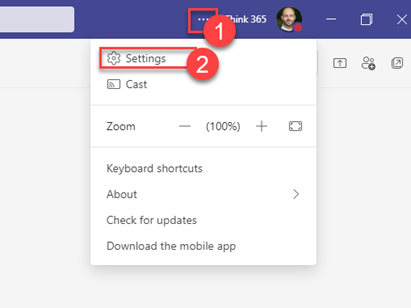
- Open the settings dialog by clicking … and then clicking Settings.
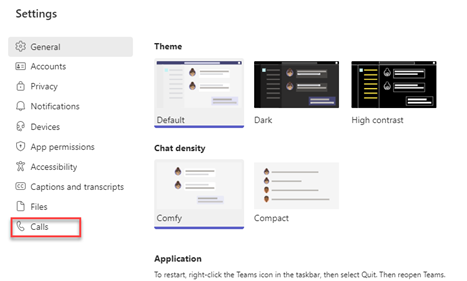
- Click on Calls to show the call options
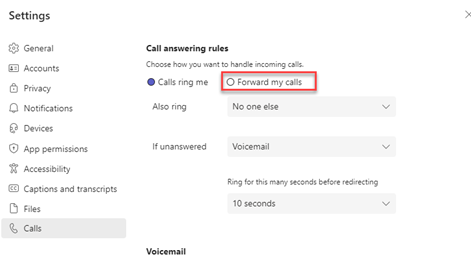
- Click on Forward my calls
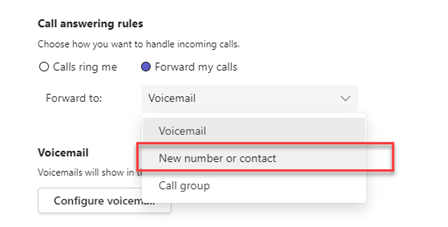
- Click on If you have configured someone before then choose them from the drop-down.
- Otherwise choose New number or contact
- Type in the name of the person that you wish to choose
- Select them
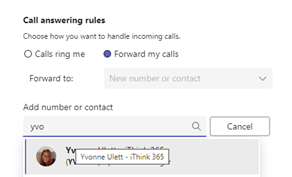
- They will appear as the selected person as shown below.
- Close the settings window and the job is done.
Stop receiving calls from your assigned call queue
Another approach you can take is if you are called as part of a call queue and that call queue has the following features:
- More than just, you are part of the call queue.
- The Microsoft Teams Admin has allowed users to remove themselves from the call queue.
You can switch off receiving calls from a particular call queue, this is done by doing the following:
- Open Microsoft Teams
- Open the settings dialog by clicking … and then clicking Settings.
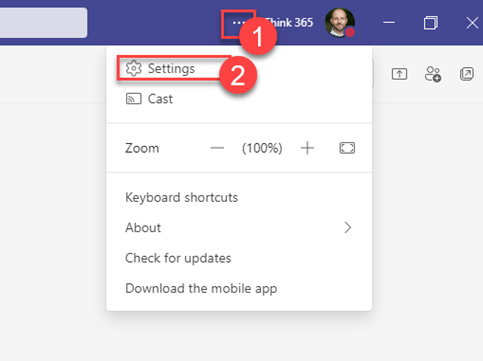
-Click on Calls to show the call options

- Scroll down the bottom and disable the call queues by clicking on each one in turn.

Topics
Microsoft TeamsRelated knowledge...
-

Beyond the Space “In Between” – Building Your Bridge to Enable AI at Scale
If you’ve watched Stranger Things, you’ll remember the ‘Upside Down’, that shadowy, unknown place that exists alongside our world. It looks familiar; the furniture is in the same place, but…
-

Microsoft 365 Frontier – A First Look at The Future of AI at Work
Artificial intelligence inside Microsoft 365 is evolving at a remarkable pace. New Copilot features and AI “agents” are arriving almost every month, and for many…
-

Real ROI From Agents: What Business Leaders Should Actually Measure
Agents aren’t valuable because they’re clever. They’re valuable because they create a higher‑performing organisation, one where work flows run smoothly, customers get better experiences, and teams can…