

5 ways to improve collaboration with Microsoft 365
This article provides a set of tips and tricks to improve the way that you and your organisation collaborate.
1. Work in Microsoft 365
Firstly, to get the most from Microsoft 365 you need to be working within the platform. So ensure that your organisation’s departments and teams have areas to work and collaborate in. If you have been working with iThink 365 then we will have talked and hopefully setup your environment for your and set up this way of working.
We suggest you use Microsoft Teams for your internal department and team collaboration areas. When you and your teams are working within Microsoft 365 then the rest of the tips will become available!
2. Use co-authoring in Microsoft Word, Excel, and PowerPoint
The main office clients support co-authoring so that more than one user can work on a piece of content at the same time. This is great when teams of people are working on a tender or other document.
Users can work together within the web versions of the office clients and the desktop clients provided that the One Drive client is running.
3. Organise you and your colleagues using @mention to assign work to people
The Microsoft Office clients such as Word, Excel, and PowerPoint have chat and comment features. The comment feature allows you to @mention someone so that you can inform them that they have something to do.
They do not have to in the document to know that they have something to do as they will get an email saying that they have been mentioned. (see Figure 1).
From this email you can go straight into the document and the comment.

Figure 1 – Example of an @mention email message
An example of this is shown below in Figure 2.

Figure 2 – Example comment in a PowerPoint slide deck
When a task has been picked up and completed then the user can resolve the task from within the PowerPoint app.

4. Bring your work, content, and processes into Microsoft Teams
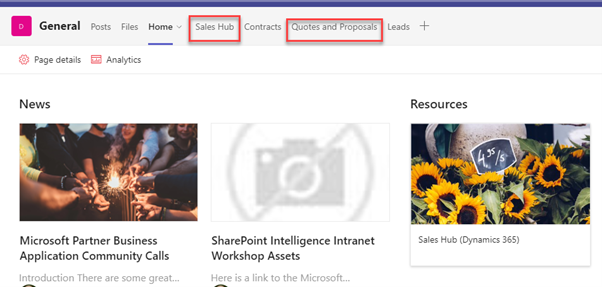
Enable your team to be able to work more efficiently and seamlessly by bringing your way of work into the relevant Microsoft Team channel.
Let’s give an example.
Imagine you are in the Sales team and you use different applications, tools and content in your day.
You use Microsoft Dynamics Sales Hub, you are creating proposals and quotes for opportunities, you need to have conversations with members of the team. To keep you productive these can be brought into Microsoft Teams via tabs so that you have one interface to access all the tools and content that you need.
This makes people more productive.
5. Enable Guests within Microsoft Teams and SharePoint
Knowing what is possible with a product is going to save you lots of time and potentially money if it stops you buying a capability of something you already own.
SharePoint has a huge number of webparts, which are the widgets that can be added to a SharePoint Page.
Please spend some time getting to know them, here are some of our favourites.
Interested to improve collaboration with Microsoft 365 ? Get in touch by contacting us here.
Related knowledge...
-

Beyond the Space “In Between” – Building Your Bridge to Enable AI at Scale
If you’ve watched Stranger Things, you’ll remember the ‘Upside Down’, that shadowy, unknown place that exists alongside our world. It looks familiar; the furniture is in the same place, but…
-

Microsoft 365 Frontier – A First Look at The Future of AI at Work
Artificial intelligence inside Microsoft 365 is evolving at a remarkable pace. New Copilot features and AI “agents” are arriving almost every month, and for many…
-

Real ROI From Agents: What Business Leaders Should Actually Measure
Agents aren’t valuable because they’re clever. They’re valuable because they create a higher‑performing organisation, one where work flows run smoothly, customers get better experiences, and teams can…